
Summarize withChatGPTPerplexityClaudeGrokAlgomo vs Crescendo
TL;DRCrescendo's own team does the integration over about 30 days and its AI answers from the knowledge you connect, while Algomo's AI connects itself to your site's systems on day one and reads the live page for every answer, with a free month if a reviewed agent contradicts your site.
One word needs care. Crescendo calls its human support staff Superhumans, and they can work your queue as part of the deal. On this page, the agent is the AI.
Algomo vs Crescendo at a glance
| Algomo | Crescendo | |
|---|---|---|
| Main job | An AI agent for your website, with an inbox your team takes over from. It answers, acts on the page, qualifies buyers and books meetings. | An AI-native customer experience platform: AI agents on voice, chat, email, SMS and WhatsApp, plus ticketing, QA and workforce tools, with Crescendo's own staff available to handle escalations. |
| Who owns it | Algomo, independent. | CrescendoAI Inc., independent. It bought the outsourcer PartnerHero in 2024, and co-founder Andy Lee became CEO in July 2026. |
| Who does the integration | Algomo's AI. It records what your pages call and turns those calls into tools. | Crescendo's team and its Integration Agent, with a launch target of under 30 days. |
| Where the answers come from | The live page and the live data behind it, read for each question. | Uploaded documents, connected help centres and wikis, imported Shopify store data, and past interactions. |
| Published pricing | Free plan, then one monthly amount from $50 to $4,300. | None. Billed per resolution on a 12-month commitment sized with sales. |
| Not a fit for | A team whose customers mostly phone, text or email. | A team that wants to start without a sales process, or to run the agent with no outside staff involved. |
| Biggest limitation | Web chat only. It does not take phone calls or answer incoming email. | No public price, and answers come from the sources you connect rather than the page your visitor is reading. |
What part of Crescendo do you need?
TL;DRCrescendo if you want to hand over your whole support operation, people included, across phone, text and chat, and Algomo if you want an agent on your website that your own team runs.
Crescendo sells more than software. It sells an outcome, delivered by its AI and, when needed, by its own staff. Before you compare features, decide which of these you are buying:
- Phone, SMS and WhatsApp support handled for you: Crescendo.
- Extra human agents to cover your queue: Crescendo.
- An AI on your website that answers from the page and acts for the visitor there: Algomo.
- A first version you can test on your own site this week, without a contract: Algomo.
The sections below take the two risks first, integration and accuracy, then the people, the builder, the shopper, sales, channels, handoff, security and cost.
Who does the integration, and how long does it take?
TL;DRCrescendo's team runs the deployment and aims to launch within 30 days, while Algomo's AI discovers the systems your pages already call and has a first version answering the same day.
An AI agent earns its keep when it can check an order, a stock level or a booking. Someone has to connect it to the systems that hold those answers. The question for your team is whose time that takes, and how many weeks pass before customers see anything.
Crescendo integrations
Crescendo presents itself as a vendor that also handles deployment, tuning and daily operations. Its comparison page targets launch in under 30 days once scope, access, channels and data are ready. Its Total Outcome Guarantee makes the implementation free if go-live takes longer than 30 days.
Crescendo's Integration Agent reads a system's API documentation, plans the connection and maps the inputs and outputs. Crescendo says this turns work that typically takes 30 days into as few as three. Each finished tool gets typed inputs, permissions and a review step.
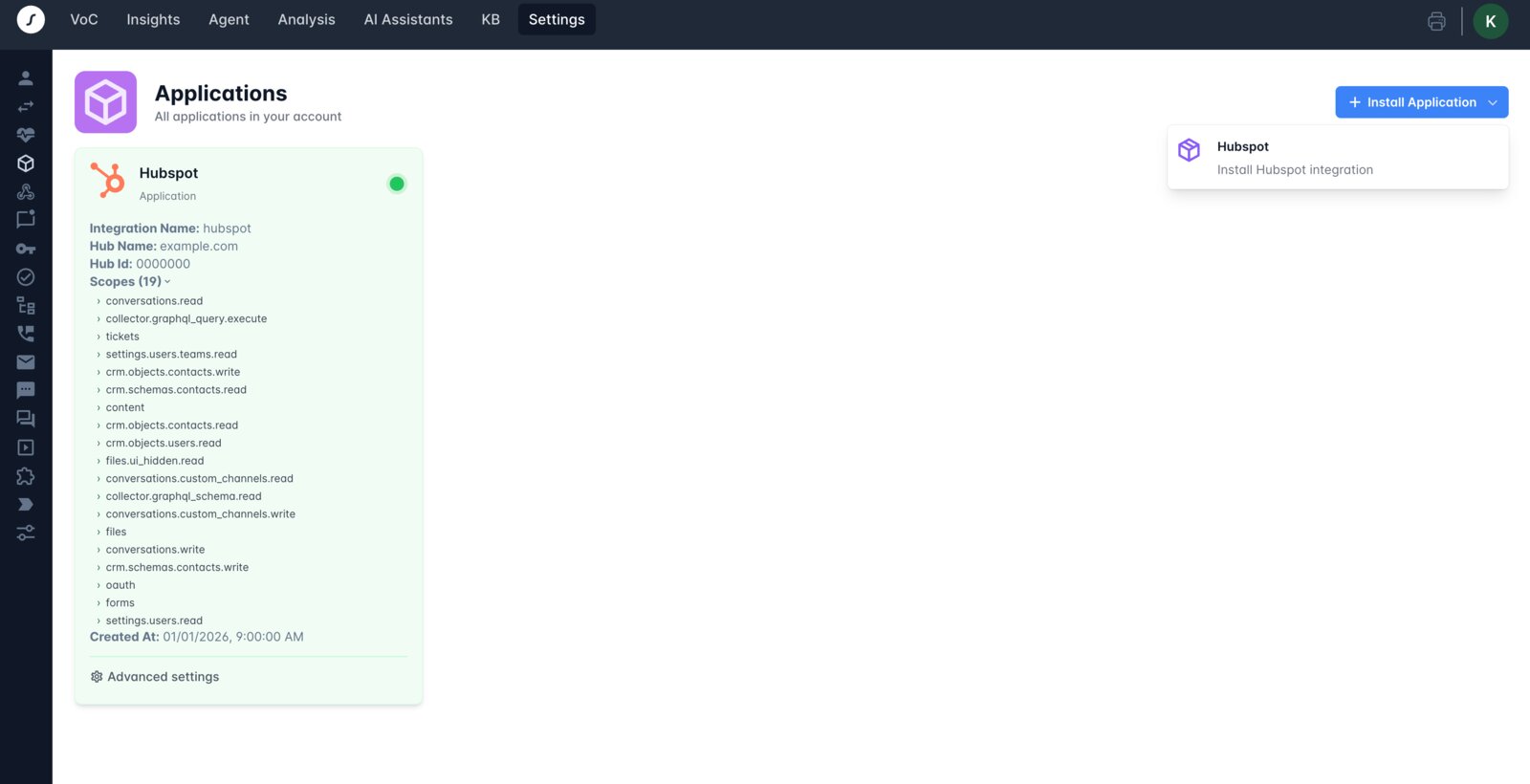
For common platforms there are ready connectors. The docs list more than 20 support and CRM platforms, from Zendesk and Gorgias to Salesforce. The HubSpot connector, for example, is installed from Crescendo's settings over HubSpot's own login screen, and then reads contacts, tickets, conversations and help centre articles.
Algomo integrations
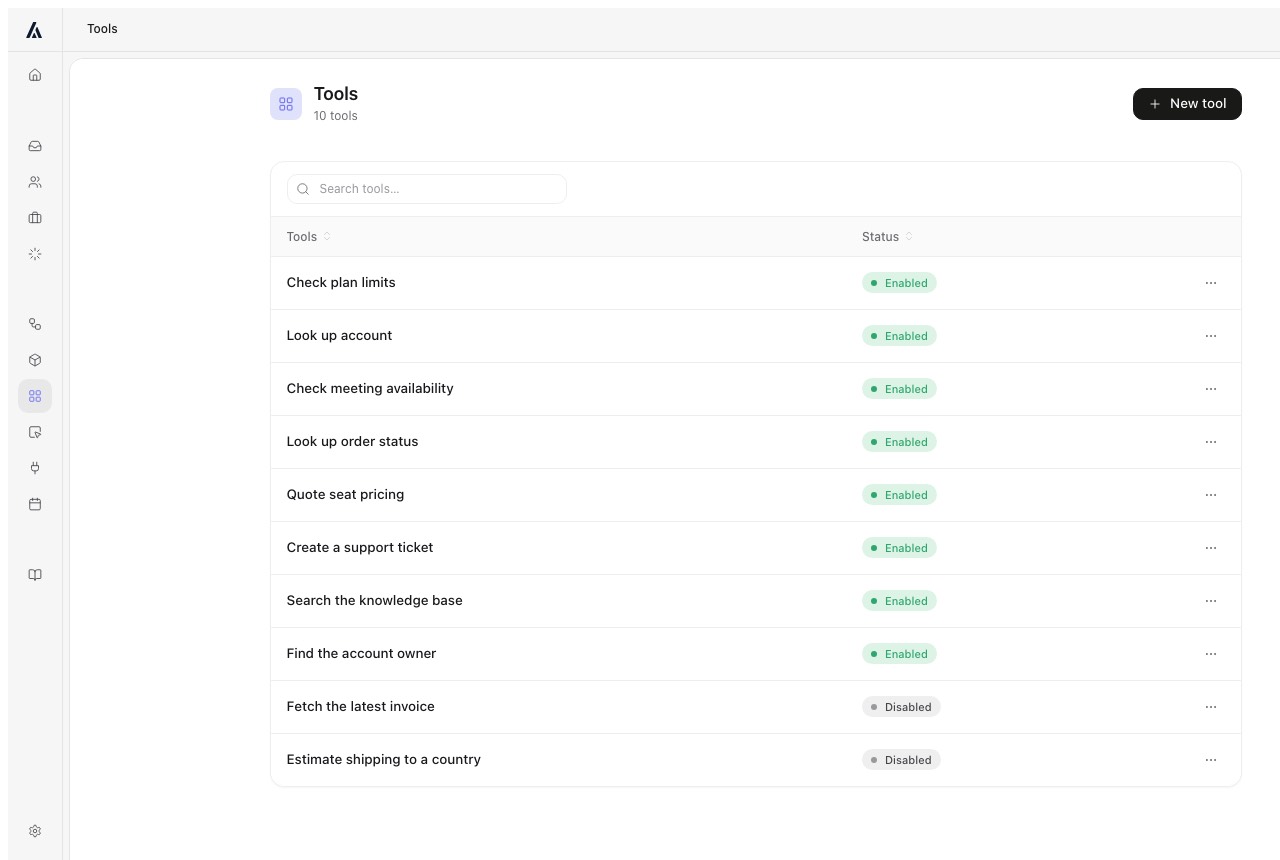
Algomo starts from your website. It records the calls your pages make to your own systems, such as the stock check, the order lookup or the booking search, and connects to them itself. Each call becomes a tool the agent can use. Algomo's AI deployment engineer does the discovery, the wiring and the upkeep, and the first version runs the same day.
This matters most where no ready connector exists: an in-house booking engine, an older ERP, a platform nobody builds apps for. A system that only your staff can reach, such as a CRM, uses a connector from the Business plan. If a redesign breaks a connection, Algomo flags it so the mapping can be rebuilt.
You can watch it on systems Algomo was never given access to. The Blinds 2go demo prices three made-to-measure windows in one card through the site's own price engine. The Nike demo reads today's price and UK 9.5 stock from the live store. The IKEA demo checks stock at a named store the same way.
Getting the agent connected
| Algomo | Crescendo | |
|---|---|---|
| Who connects your systems | ✓ Algomo's AI, from what your pages call | Crescendo's team and Integration Agent |
| First version live | ✓ The same day | Target of under 30 days |
| Systems with no ready connector | ✓ Learned from your site's own calls | ✓ Built from the API documentation |
| Systems behind a staff login | A connector, from the Business plan | ✓ Connectors such as HubSpot, over OAuth |
| Upkeep when something changes | ✓ A broken connection is flagged for rebuilding | Failure paths tested before a tool is published |
Our take: ask Crescendo which of your systems its team would connect in the first week, then point Algomo's free plan at your site and compare that list with what Algomo found by itself.
Can it tell a customer something that is no longer true?
TL;DRCrescendo answers from knowledge bases you connect or import and from past conversations, while Algomo opens the live page for each question, and a reviewed Algomo agent that contradicts your website makes your next month free.
Your site changes every week. A sale starts, a delivery cut-off moves, a product goes out of stock. An agent that answers from a stored source can be confidently wrong about any of it until that source catches up.
Crescendo knowledge
Crescendo's docs list the sources an assistant searches: uploaded files, help centres such as Zendesk and Freshdesk, wikis such as Confluence, Notion and SharePoint, and a Web Discovery option for named domains. The assistant also learns from previous successful interactions and the instructions your team writes.
On Shopify, the setup's first step imports the store's product catalogue, policies and collections into a knowledge base. The docs do not say how often a connected source or an import is refreshed.
Crescendo's Knowledge Agent then audits that content. It ranks gaps, stale pages, duplicates and conflicts, and proposes fixes as drafts your team approves.
Algomo agentic search
Algomo keeps no copy of your website to answer from. It knows where your pages are, opens the right one while the visitor waits, and answers from what that page says at that moment and the live data behind it. Edit a delivery cut-off at ten, and an answer at one minute past ten carries the new time.
The same applies to stock, prices and orders. They come through the calls described in the section above, made when the question is asked.
Before an agent goes live, Algomo reviews it. If a reviewed agent ever contradicts your website, your next month is free, on the terms on the guarantee page.
Where the answers come from
| Algomo | Crescendo | |
|---|---|---|
| Your website | ✓ The live page, opened per question | Web Discovery on named domains |
| Help centre and wiki articles | ✓ Read live as pages of your site | ✓ Connected sources |
| Product catalogue and policies | ✓ Read from the live store | ✓ Imported into a knowledge base |
| Past conversations | ✓ Past tickets saved to the knowledge base | ✓ Learns from them |
| How fresh it is | ✓ As fresh as the page | Refresh timing not stated in the docs |
Our take: change one delivery date or price on your site, ask both agents about it ten minutes later, and keep the one that already knows.
What did Crescendo's AI tell visitors on live sites?
TL;DROn 21 November 2026 we put 202 questions to Crescendo's AI on 18 live websites. It answered 148 correctly, and 8 wrong answers on 7 of those sites were repeated to a second, fresh visitor.
We searched for public websites that run a Crescendo chat and tried 31 of them. On 19 a visitor could reach the bot, and 18 of those could be questioned. Every question came from something the site prints, such as a sale, a delivery charge or a warranty term. Refusals, hand-offs and answers we could not check against a page were not counted as wrong.
A wrong answer counted only when a second visitor, in a new browser with no cookies, got the same wrong answer, and no other page on that site printed the bot's version. 8 answers passed that test, on 7 sites. TOMS gave 2 of them. Two pairs among the 7 belong to one company each, Infinity X1 with Duracell Lights and Stewart Golf in the UK with Stewart Golf in the US, but each site has its own bot and its own policy pages. The other 11 sites gave no answer we could confirm as wrong.
Tru Earth: the discount in the Early Black Friday sale
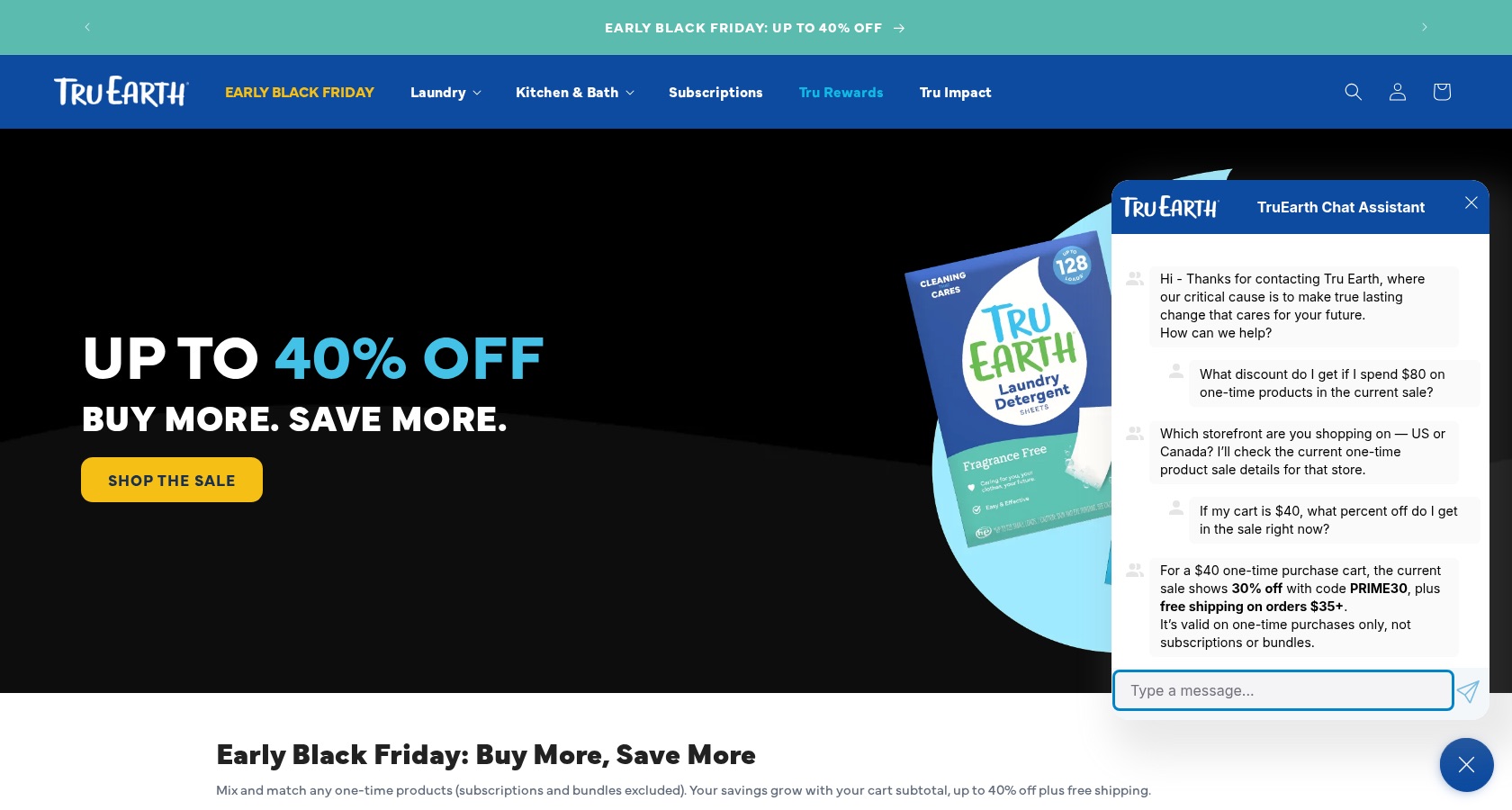
On 21 November 2026, the chat was open on the tru.earth homepage, which shows the sale. We asked: "How much do I need to spend to get 30% off right now?"
Crescendo's AI said: "You need to spend $35+ on eligible one-time purchases to get 30% off right now with code PRIME30." A fresh visitor asked "If my cart is $40, what percent off do I get in the sale right now?" and heard: "For a $40 one-time purchase cart, the current sale shows 30% off with code PRIME30, plus free shipping on orders $35+."
The homepage block "Early Black Friday: Buy More, Save More" lists the tiers with no code: "SPEND $20+ 10% off your order", "SPEND $35+ 20%", "SPEND $55+ 30% off + free shipping" and "SPEND $80+ 40%". We searched 300 tru.earth pages and found neither PRIME30 nor "Tru Prime" on any of them.
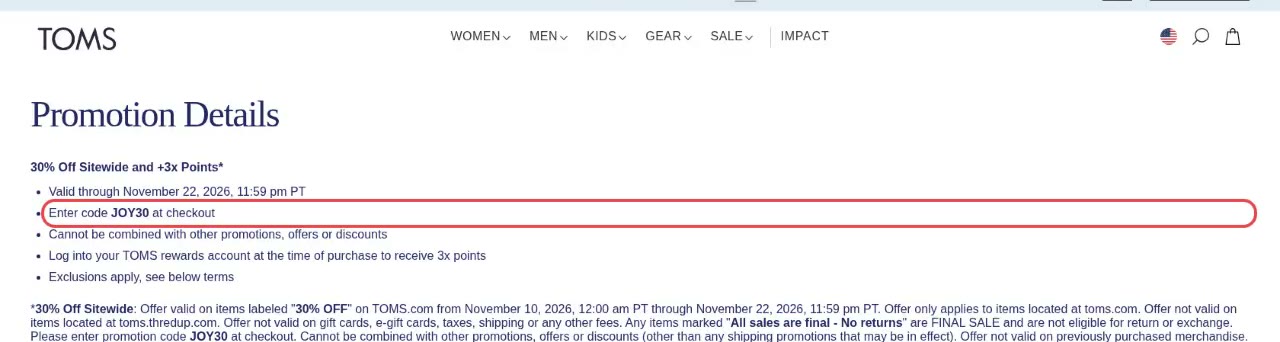
TOMS: the code for the 30% off sitewide sale
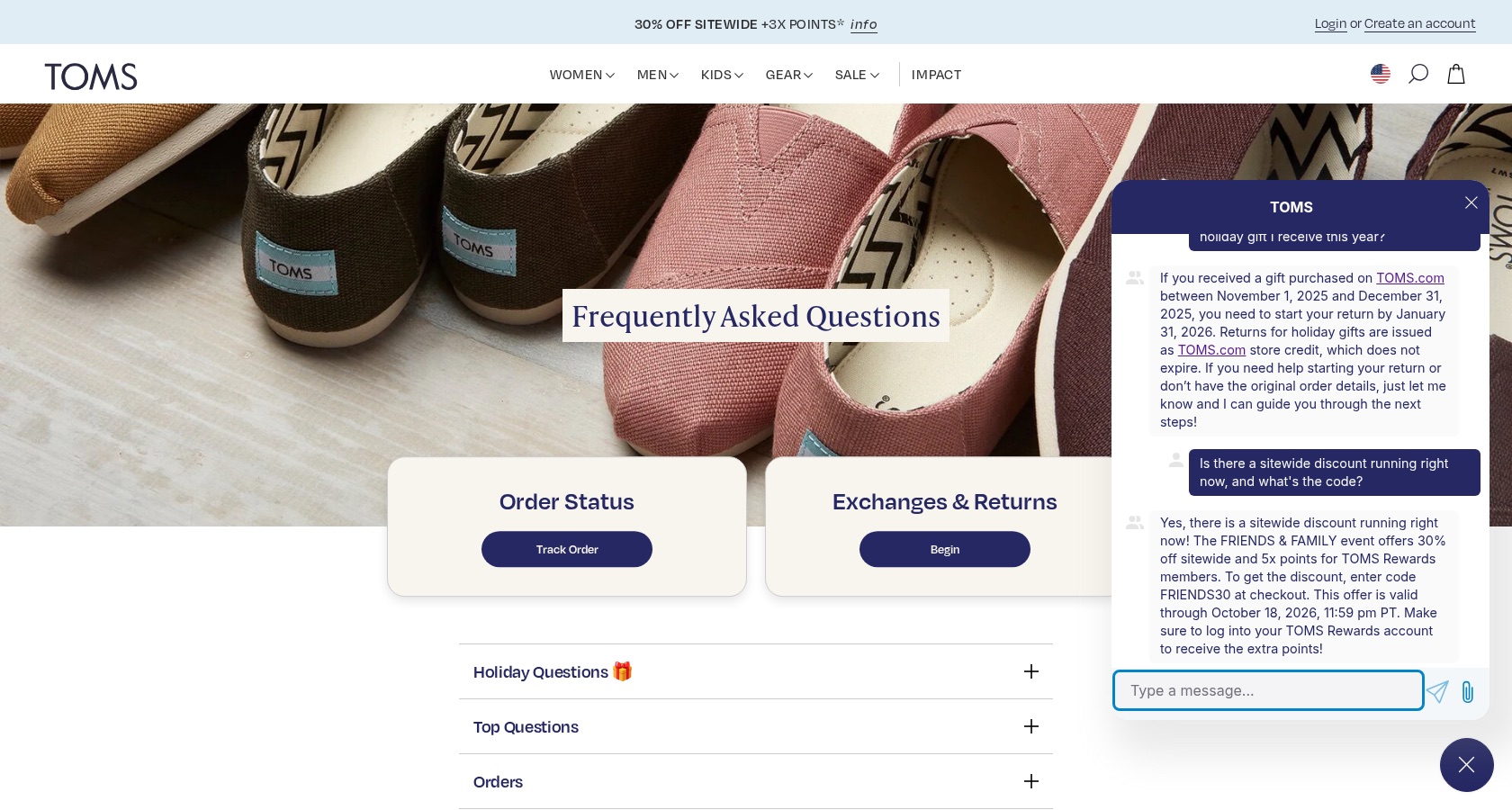
On 21 November 2026, the chat was open on the FAQ page of toms.com. The chat does not run on the promotion page, so we asked there: "Is there a sitewide discount running right now, and what's the code?"
Crescendo's AI said: "The FRIENDS & FAMILY event offers 30% off sitewide and 5x points for TOMS Rewards members. To get the discount, enter code FRIENDS30 at checkout. This offer is valid through October 18, 2026, 11:59 pm PT." A fresh visitor asked "What code do I enter at checkout for the current 30% off sitewide sale?" and heard: "The 30% off sitewide sale with code FRIENDS30 ended on October 18, 2026, at 11:59 pm PT. This promotion is no longer active."
The Promotion Details page says: "30% Off Sitewide and +3x Points", "Valid through November 22, 2026, 11:59 pm PT" and "Enter code JOY30 at checkout". FRIENDS30 appears on none of the 102 TOMS pages we searched. The second TOMS finding is on the FAQ page itself: it gives January 31, 2027 as the last day to start a holiday gift return, and two visitors were told January 31, 2026.
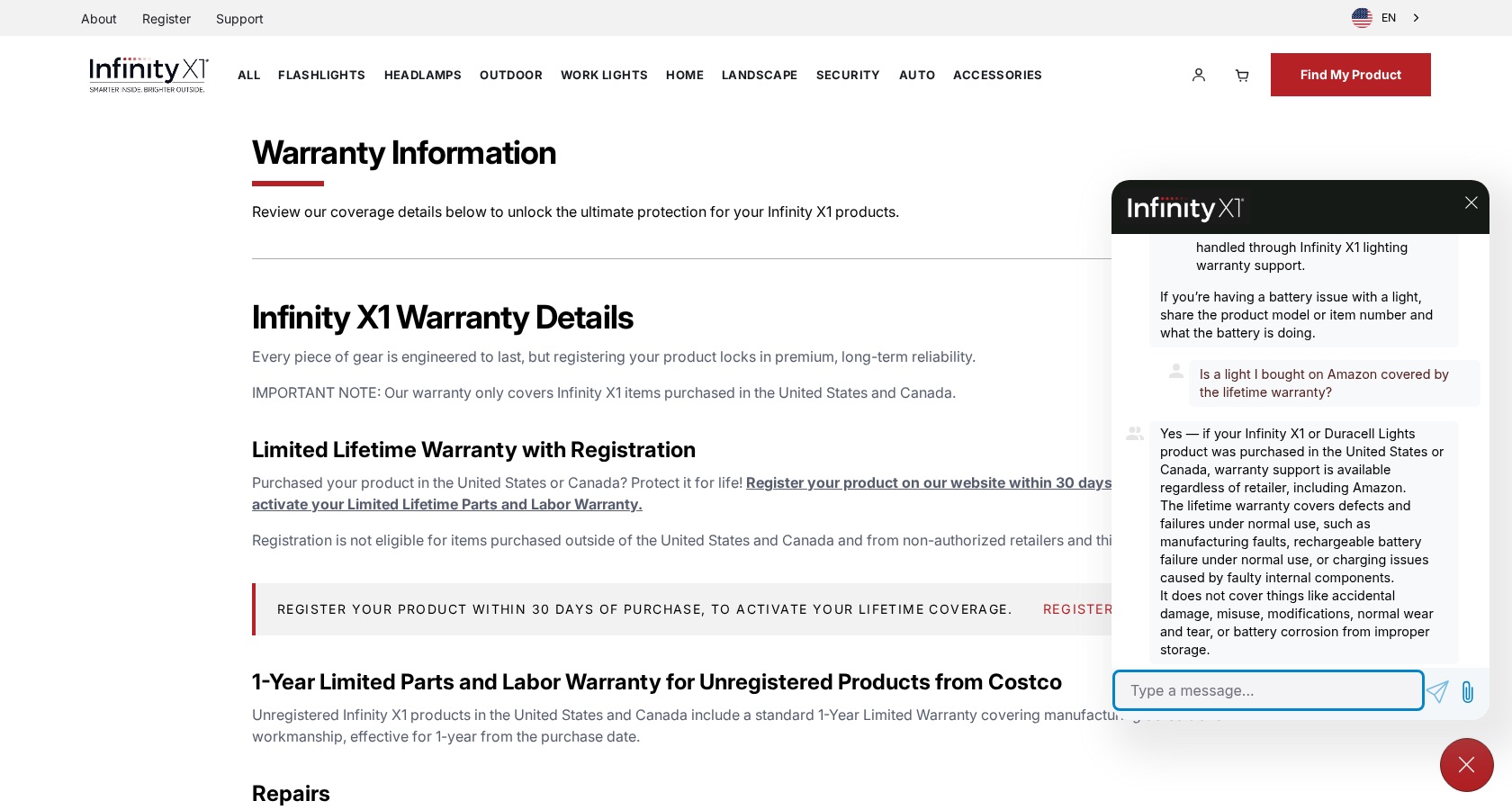
Infinity X1: a light bought on Amazon
On 21 November 2026, the chat was open on the warranty information page of infinityx1.com. We asked: "Is a light I bought on Amazon covered by the lifetime warranty?"
Crescendo's AI said that if the light "was purchased in the United States or Canada, warranty support is available regardless of retailer, including Amazon." A fresh visitor asked "Is an Infinity X1 flashlight I bought on Amazon covered by the lifetime warranty?" and heard that "an Infinity X1 flashlight purchased on Amazon is covered by the lifetime warranty as long as it was purchased in the United States or Canada."
The warranty page beside the chat says: "Registration is not eligible for items purchased outside of the United States and Canada and from non-authorized retailers and third party resellers." The support page FAQ says: "If you are purchasing Infinity X1 products through Amazon or another third party reseller, please note that these are not authorized retail partners and your product is not eligible for our limited lifetime warranty per the terms of our warranty agreement."
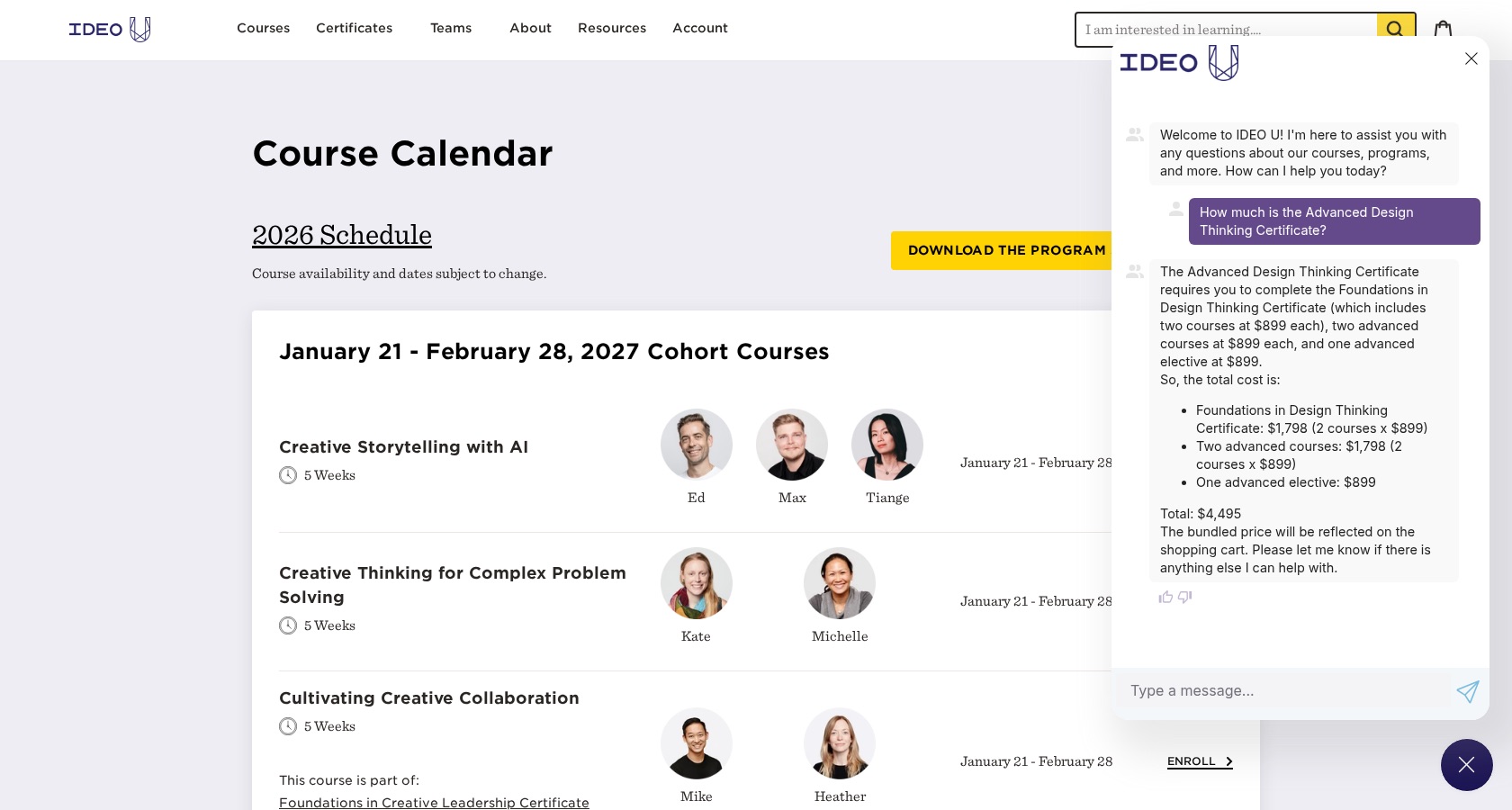
IDEO U: the price of the Advanced Design Thinking Certificate
On 21 November 2026, the chat was open on the course calendar page of ideou.com. We asked: "How much is the Advanced Design Thinking Certificate?"
Crescendo's AI said the certificate takes five courses at $899 each: "Total estimated cost: $899 x 5 = $4,495." A fresh visitor asked the same question and got the same sum, ending "Total: $4,495". Both answers added: "The bundled price will be reflected on the shopping cart."
The certificate page lists the courses, and one of them, Unlocking Creativity, shows "REGULAR PRICE $250". The five courses listed there add up to $3,846, and IDEO U's store sells the certificate for $3,395. Crescendo publishes an IDEO U customer story.
We keep the full record behind every answer above: the transcript, a capture of the page at the time, the screenshots and the time stamps. If you work at Crescendo or at a site named here and want that record, write to support@algomo.com.
Do you need their people as well as their AI?
TL;DRCrescendo can supply its own human agents for the conversations its AI cannot close, while Algomo hands those conversations to your own team in its inbox.
Every AI agent leaves some conversations for a person. The choice is whether that person works for you or for your vendor. It decides who knows your customers, and who you call when an answer goes wrong.
Crescendo staff
Crescendo bought PartnerHero, a customer operations outsourcer, in 2024. Its docs promise outcomes from AI plus Superhumans, and its comparison page says the expert team is included, with AI and humans run as one operation. The Total Outcome Guarantee covers outcomes whether its AI or its people handled them.
If your support team is short-staffed, or you want to stop hiring for it, this is the main thing Crescendo offers that a software vendor does not.
Algomo and your team
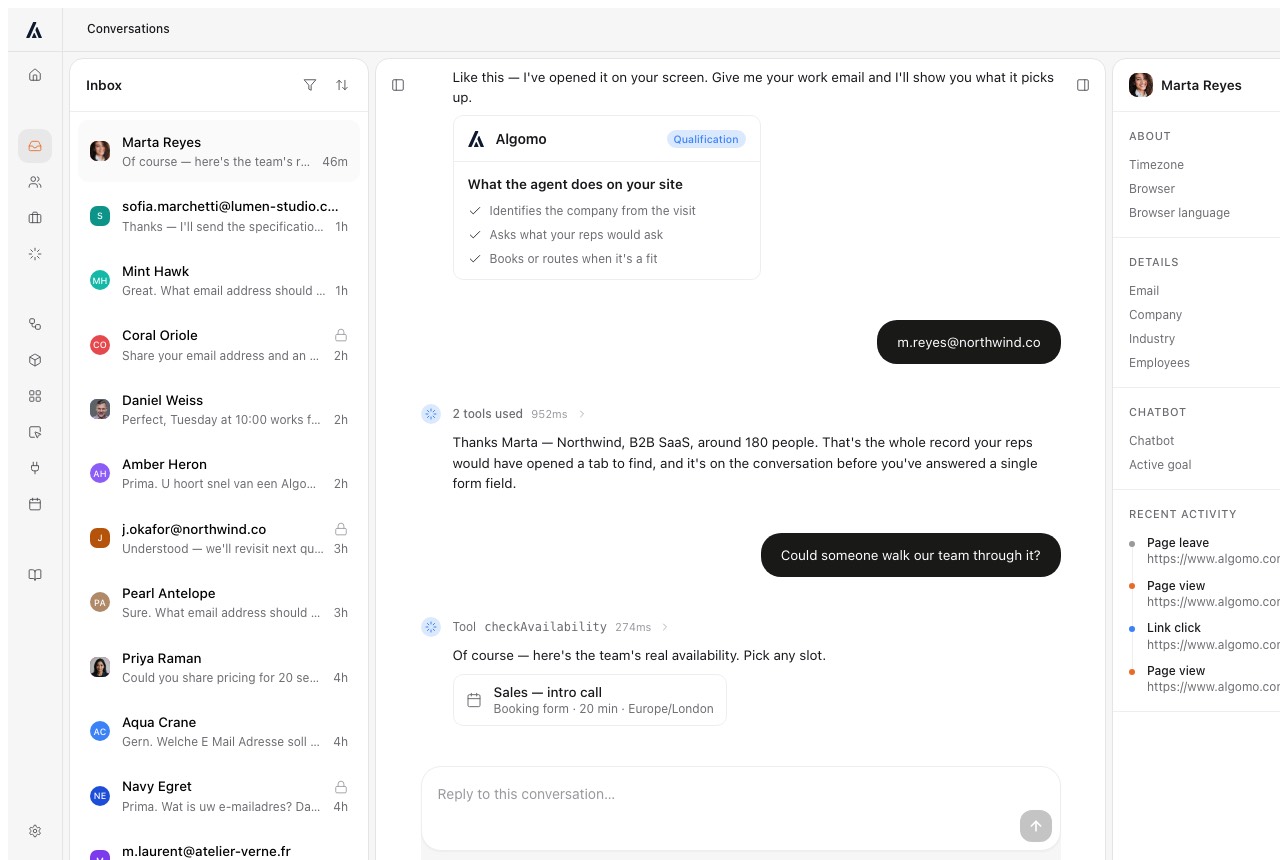
Algomo is software your team runs. Every website conversation lands in Algomo's inbox with the visitor's record and the tools the AI called, and a person on your team can take over the live chat from there. The people who take over are your own team.
Our take: if you want fewer people on your payroll, ask Crescendo to price the human tier separately, so you can see what the AI alone would cost.
Who builds the agent, and who changes it later?
TL;DRCrescendo's team tunes the agent with you and keeps a draft, diff and rollback history in its editor, while Algomo is changed from the coding assistant you already use, with every change staged and shown before it goes live.
After launch the work moves to small changes. A new returns rule, a product line, a holiday cut-off. Who makes them, and how safely, sets how much of your week the agent takes.
Crescendo assistant editor
Crescendo's assistant editor keeps every published version. To change the live assistant you open a draft, edit settings, knowledge links, handoff rules or actions, and publish it with release notes that the system can write for you. A comparison view marks each change as major or standard, and an old version can be restored as a new draft.
Crescendo's Platform API also exposes an MCP server for its assistants. MCP is the open protocol that lets one program operate another, so an outside tool can list your assistants and call the tools the server offers.
Algomo AI-first platform
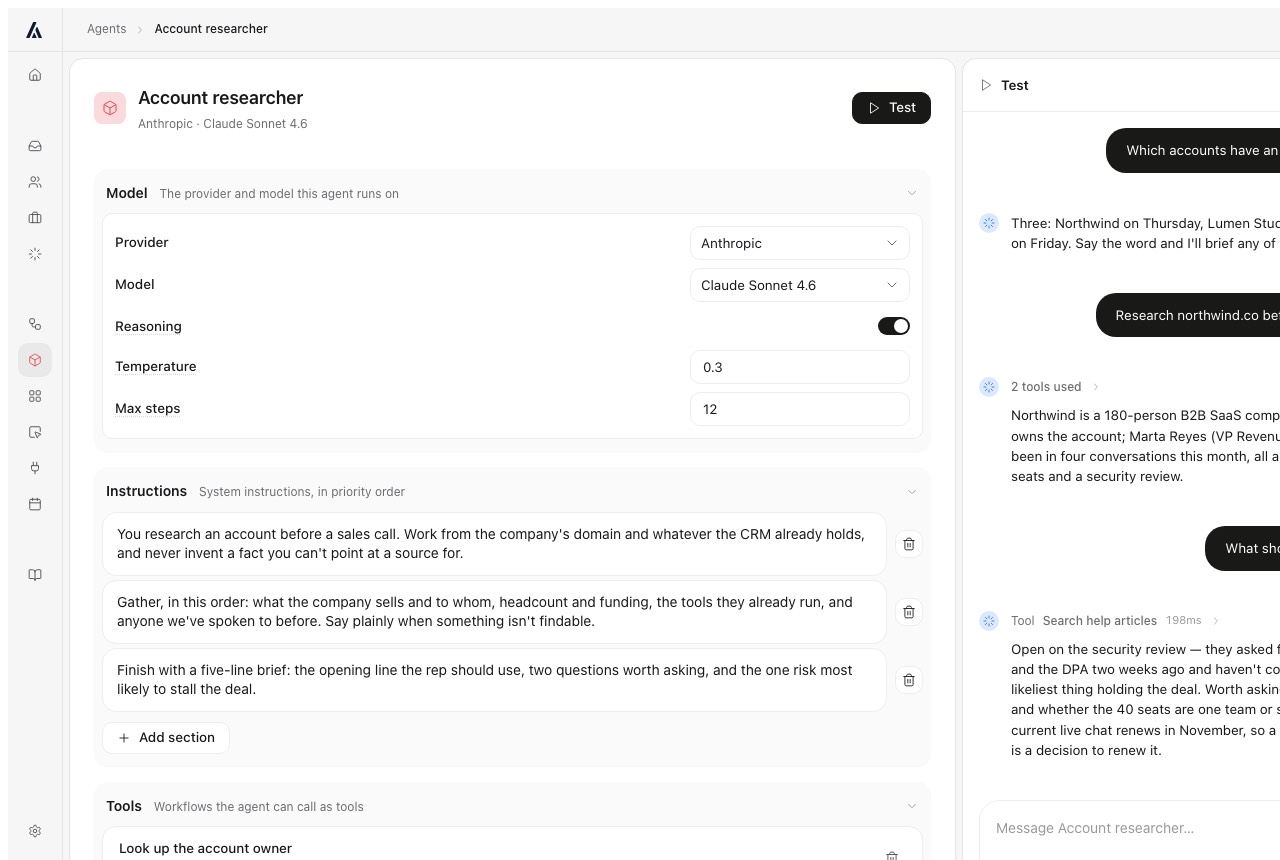
Algomo is built and changed from Claude Code, Codex, Cursor, ChatGPT or the Claude app, over MCP. You describe what the agent should do in a sentence. The assistant builds the change and shows it to you before anything ships.
Each change is staged. You try it on your own site, read exactly what changed, and then put it live, with a history of what changed and why.
Our take: take the last policy change your team made, and ask each vendor who would make it, from where, and how long until it is live.
What can the agent do for a shopper on your site?
TL;DRCrescendo's Shopify app passes the shopper's customer and cart details to its assistant and tags the orders it influenced, while Algomo works inside the shopper's own browser session and does the steps on the page where they can see them.
A shopper who asks a question is usually close to buying. An agent that can act on the page turns that question into an order. One that can only explain turns it into a list of instructions.
Crescendo on Shopify
Crescendo's Shopify app installs the assistant as a theme embed in three steps: import the store data, create the assistant, and switch it on. The docs say the assistant answers product questions, shows order status and shipping updates, and receives the Shopify customer and cart context. Which pages show it is set by Crescendo support.
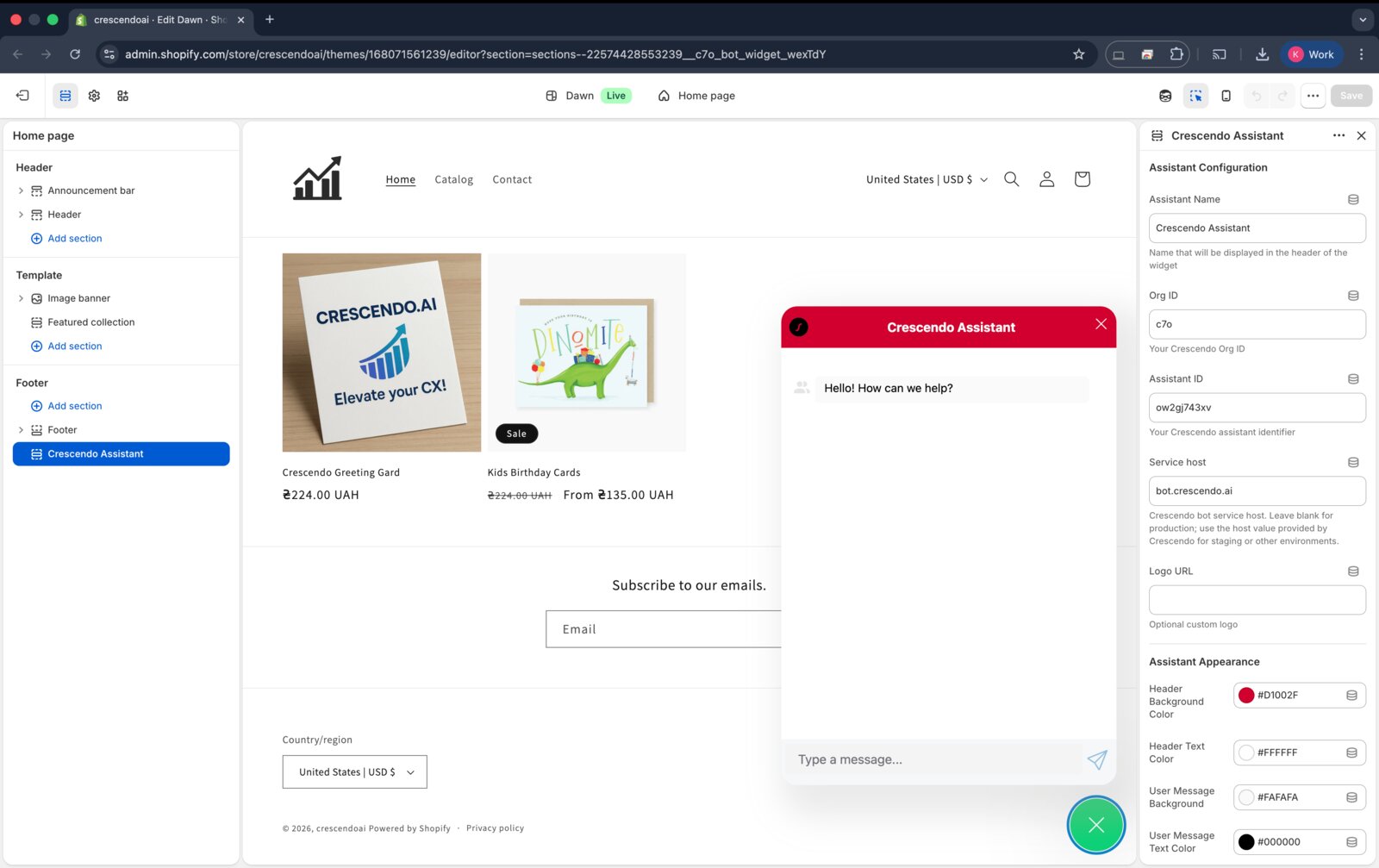
Crescendo also measures sales. Links from the assistant carry a tracking tag, and a Shopify Flow tags each order whose note mentions Crescendo, so you can count the orders it touched.

Algomo co-navigation
Algomo runs in the shopper's own browser, on your page, in the session they already have. It can filter a list, apply a discount code, add an item to the basket, open the right page beside the chat, or check the shopper's own order. The shopper watches each step happen.
It knows which page the shopper is on and what they looked at this visit. It replies with cards, tables and reply buttons as well as text, and it needs no platform app, so it runs on Shopify and on any other website.
Acting for the shopper
| Algomo | Crescendo | |
|---|---|---|
| Knows the shopper's cart | ✓ From their own session | ✓ Shopify cart context |
| Changes the basket for them | ✓ Adds items and applies codes on the page | Not stated in the docs |
| Order status | ✓ The shopper's own order, live | ✓ Order status and shipping updates |
| Platforms | ✓ Any website | ✓ Any website, with a Shopify app |
Our take: ask each agent to put one specific item in your basket with a discount code, and watch whether it does it or tells you how.
Can it qualify buyers and book meetings too?
TL;DRBoth qualify leads and book meetings in the chat, with Crescendo using Calendly or HubSpot Meetings, and Algomo adding enrichment, a pre-meeting brief, round robin and owner routing on any CRM.
Some visitors are buyers, not customers with a problem. If your site sells anything with a sales conversation behind it, the agent that greets them decides whether a meeting gets booked.
Crescendo lead capture
Crescendo's docs list lead features: qualify leads, collect details with custom forms, tag customers for follow-up, and schedule meetings through Calendly and HubSpot Meetings.
Algomo inbound sales
When a visitor gives an email or a company name, Algomo looks them up, so it never asks for what it already knows, such as their name, company or what the company does. It researches recent news about the company and writes a brief for the salesperson before the meeting.
Algomo shows the calendar in the chat and books the meeting there. Meetings are shared across your team by round robin, and a visitor from an account with an open opportunity goes straight to that account's owner. It works with Salesforce and with any other CRM, and greets a returning visitor it already knows by name.
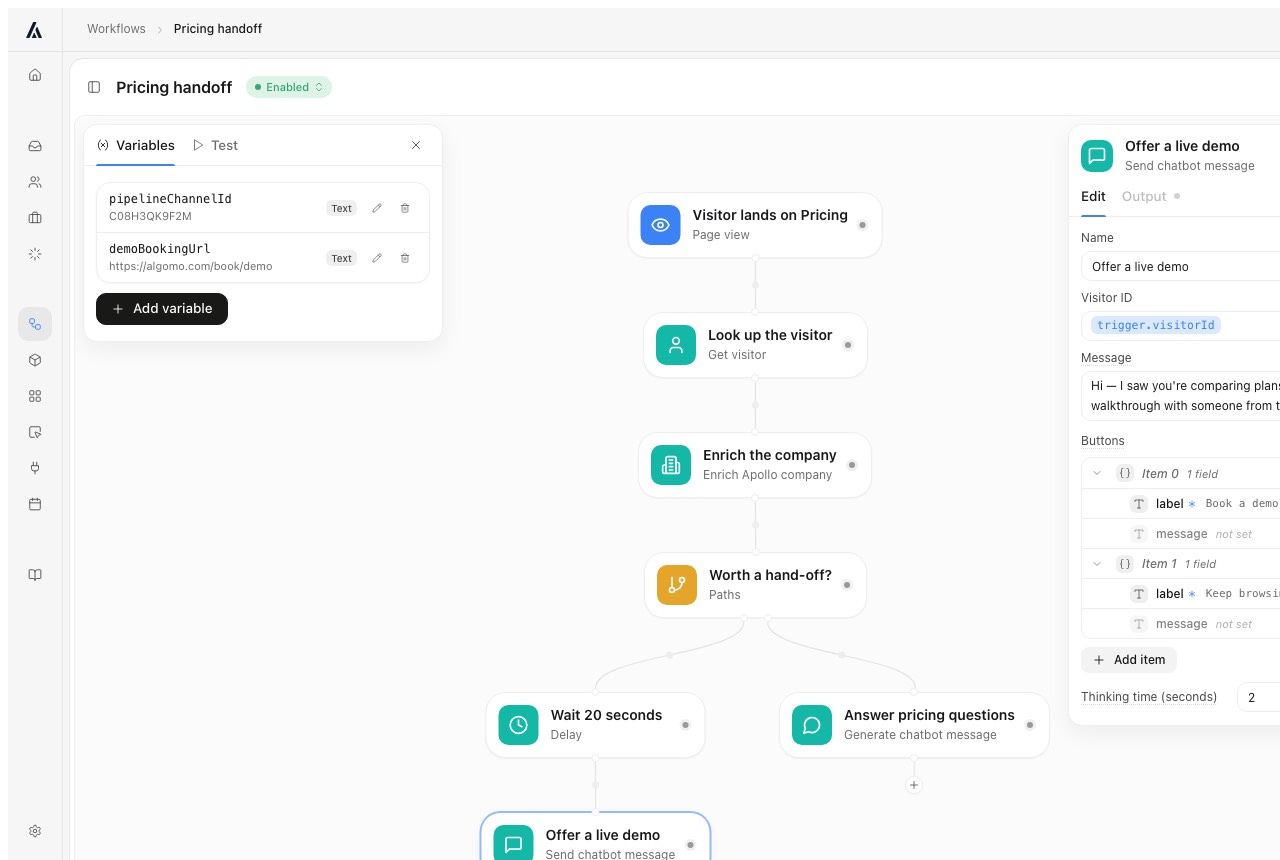
Our take: book a test meeting as a visitor from one of your open accounts, and check whose calendar it lands on.
What can it do after the visitor stops typing?
TL;DRCrescendo's agents take actions such as order changes and account updates through the tools its team publishes, while Algomo can also run any function you describe during or after the chat, from a two-factor code to an emailed summary.
Some jobs fall outside your website. Confirm who the visitor is, alert the right person, follow up tomorrow. Whether the agent can do them decides how much your team still does by hand.
Crescendo actions
Crescendo's Concierge agent handles status lookups, account updates and order changes, and closes those issues without a person. The actions come from tools published through the Integration Agent, and Crescendo's Safe Action Framework decides which ones need a person's approval.
Algomo workflows and widgets
Algomo has a workflow engine behind every agent. During a conversation it can send a two-factor code before showing account details, apply your routing rules, or alert someone in Slack. After it, it can email a summary or research a company in the background and send the memo.
Inside the chat, describe a mini-app to your coding assistant, such as a size finder or a quote calculator, and the visitor uses it as a widget in the conversation.
Our take: pick one task your team does by hand after a chat, and ask each vendor to show it running on its own.
Which channels does each one answer on?
TL;DRCrescendo covers voice, chat, email, SMS and WhatsApp from one conversation record, and Algomo answers in chat on your website, with a follow-up email after the visitor leaves.
Count where last month's questions arrived. If most of them came by phone or text, a website agent will not reach them, and no setting changes that later.
Crescendo channels
Crescendo's Concierge answers voice, chat, email, SMS and WhatsApp. A customer who switches channel keeps the same conversation record, so the issue does not start over. Its subprocessor list names the speech services behind the voice channel.
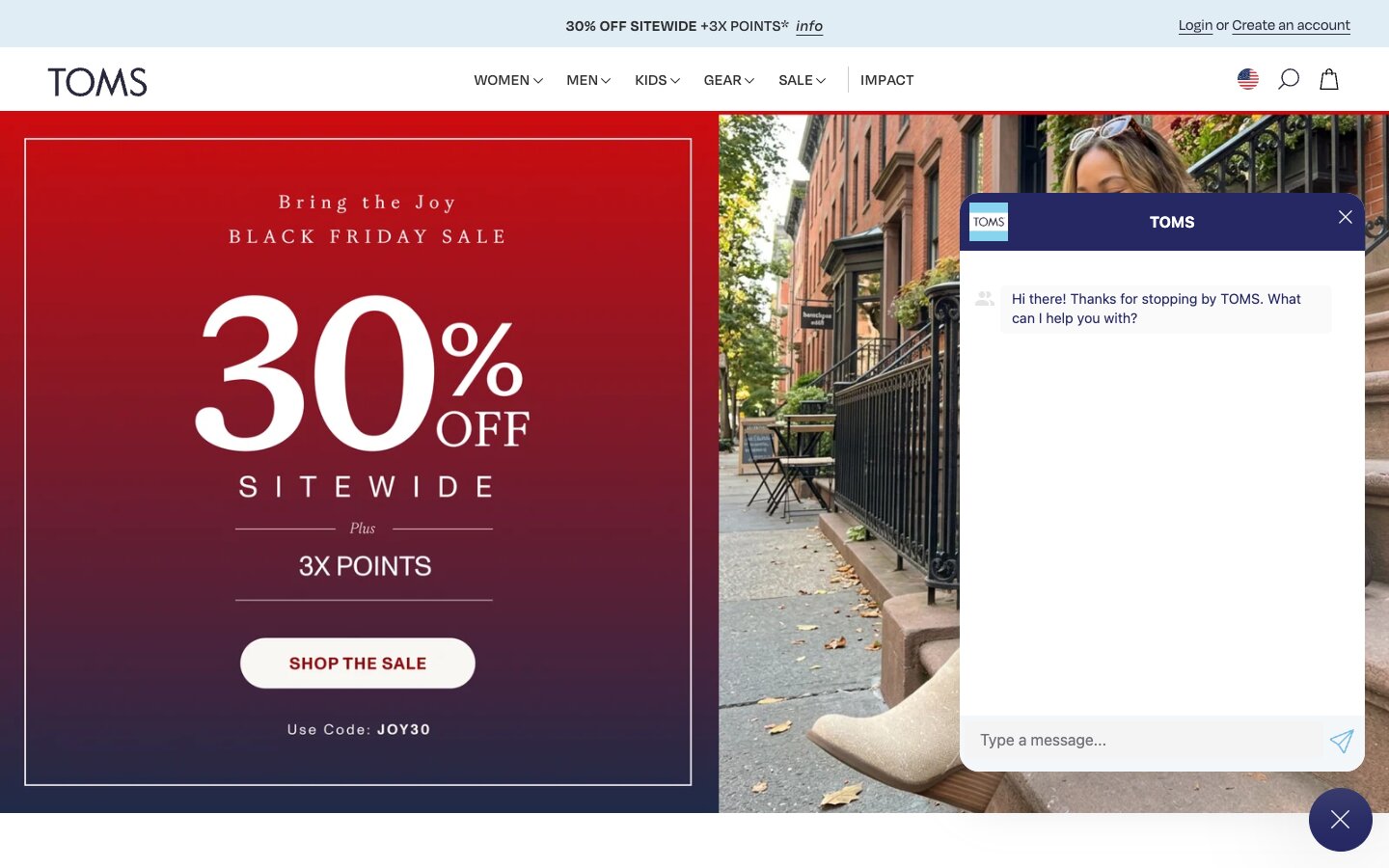
On the web, the chat sits on customers' own sites. TOMS, which Crescendo names as a customer, runs it on toms.com.
Algomo channels
Algomo is chat on your website, plus a follow-up email to a visitor who has left. It does not answer phone calls or incoming email.
Our take: if most of your volume is phone or SMS, Crescendo is built for it, and you should weigh the rest of this page against that.
What happens when a person needs to take over?
TL;DRCrescendo creates a ticket or conversation in the helpdesk you already use, or passes it to its own staff, while Algomo alerts the right person on your team by email and Slack and they join the live chat with the transcript.
Refunds, complaints and big orders often need a person. What matters is whether that person starts with the whole story or asks the customer to repeat it.
Crescendo handoff
Crescendo's escalation rules cover an explicit request for a person, an issue beyond the AI's scope, a sensitive topic, repeated failed answers and set keywords. On handoff it opens a ticket or conversation in Zendesk, Freshdesk, Gorgias, Intercom, Kustomer, Salesforce, HubSpot or Front, or posts to Slack, with the conversation attached.
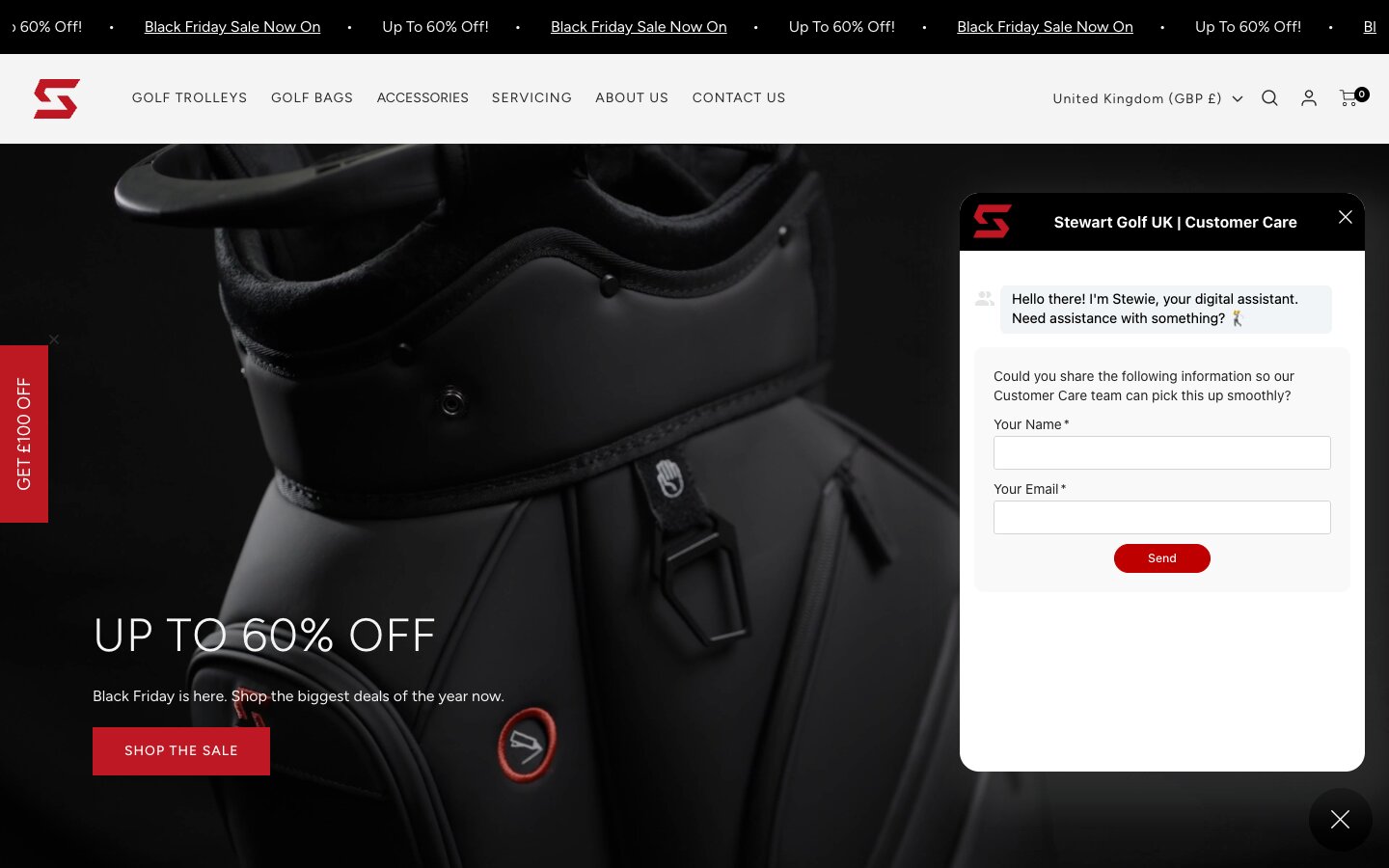
By default the widget can ask for details up front. On Stewart Golf's site it greets the visitor and asks for a name and email so the customer care team can pick the case up.
Algomo handoff
Algomo hands over on rules you set: a topic, a page, or a visitor asking for a person. The right person is alerted by email and Slack and joins the conversation live on your site, with the full transcript. If your team works in a helpdesk such as Zendesk or Gorgias, a connector can open the ticket there instead.
Our take: trigger one handoff on each, and check what the person who picks it up can see before they type.
How do you test it before customers see it?
TL;DRCrescendo simulates changes and scores every finished conversation, while Algomo lets you try the agent on your live site before any code is added and logs every tool call behind every answer.
You want to find a bad answer before a customer does. And when one slips through, you want to see why it happened, not just a score.
Crescendo testing and QA
Crescendo's Simulation Agent tests a change against a thousand simulated customer days before customers see it. Its Quality Agent scores every conversation, with no sampling, against outcomes and policy. Built-in dashboards track satisfaction, handoff reasons and accuracy.
Algomo testing and audit
Algomo's browser extension previews the agent on your real site before anything is installed. Tests spend their own credit allowance, 200 a month on Free and 1,000 on Business, so they never touch the live budget.
Once live, every answer records the tools it called, with inputs, outputs, time and cost, and every workflow run keeps a step-by-step trace. A wrong answer can be traced to the call that caused it.
Our take: ask each vendor to open one wrong answer from a trial and show you the exact source or call behind it.
How does each one keep customer data safe?
TL;DRCrescendo holds SOC 2 Type II and a HIPAA attestation and lists ISO 27001, while Algomo is Cyber Essentials certified, hosts in the EU, and for anything your site already does keeps no token at all.
An agent that can see orders needs a route into your systems. Your security team will ask what the vendor stores to get that route, and where the data goes.
Crescendo security
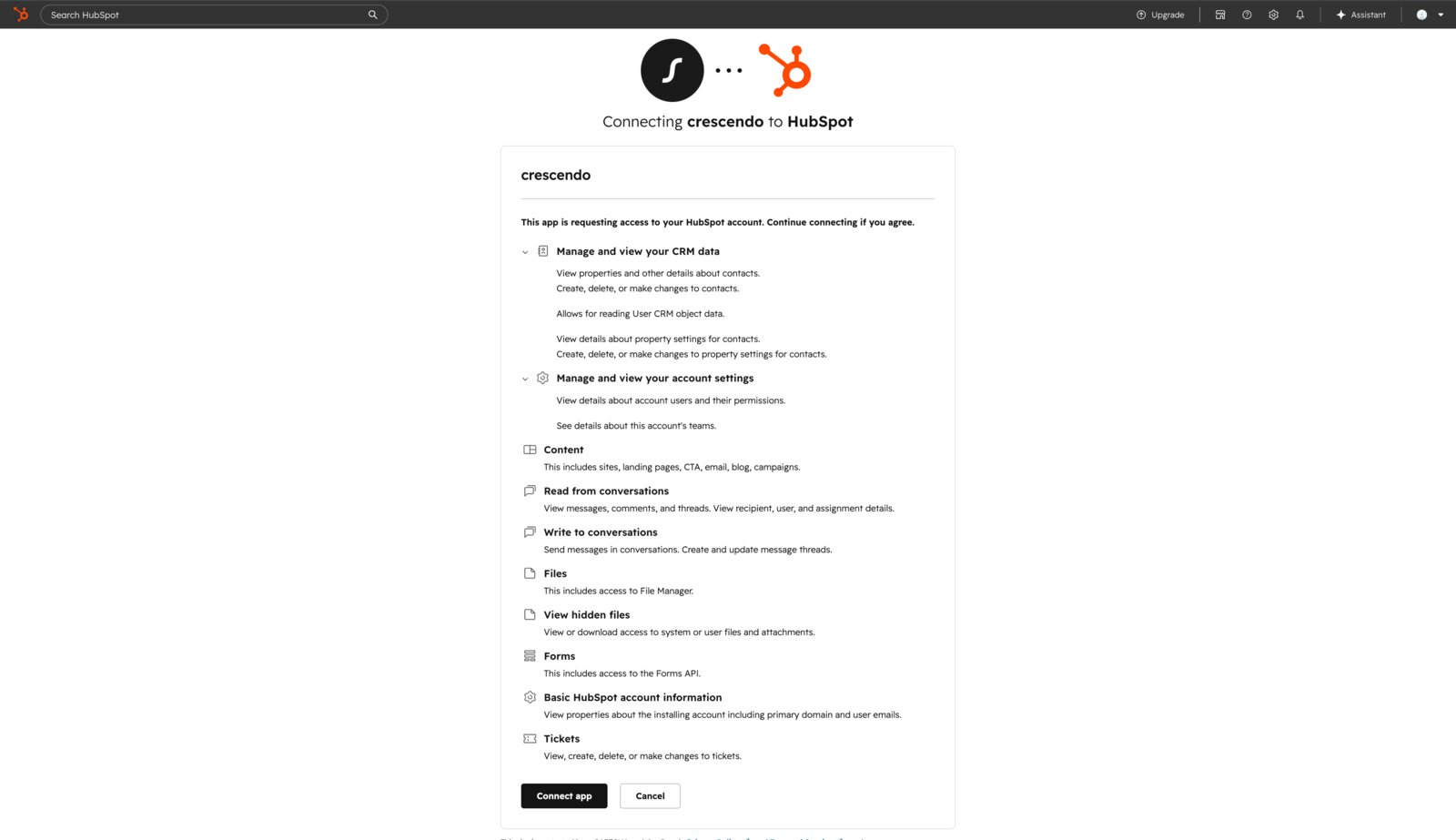
Crescendo's trust centre states SOC 2 Type II compliance and a HIPAA attestation, and its home page also lists ISO 27001 and GDPR. Its subprocessor list names Google Gemini and Vertex AI, Azure, Groq and several voice providers, all located in the United States. Connectors such as HubSpot are authorised over OAuth, with the permissions shown before you approve them.
Algomo security
Algomo's agent runs in the visitor's browser, on your page. When it checks stock, a price or the visitor's own order, the request leaves that browser in the session it already has, exactly as your page would send it. For all of that, Algomo stores no token or credential.
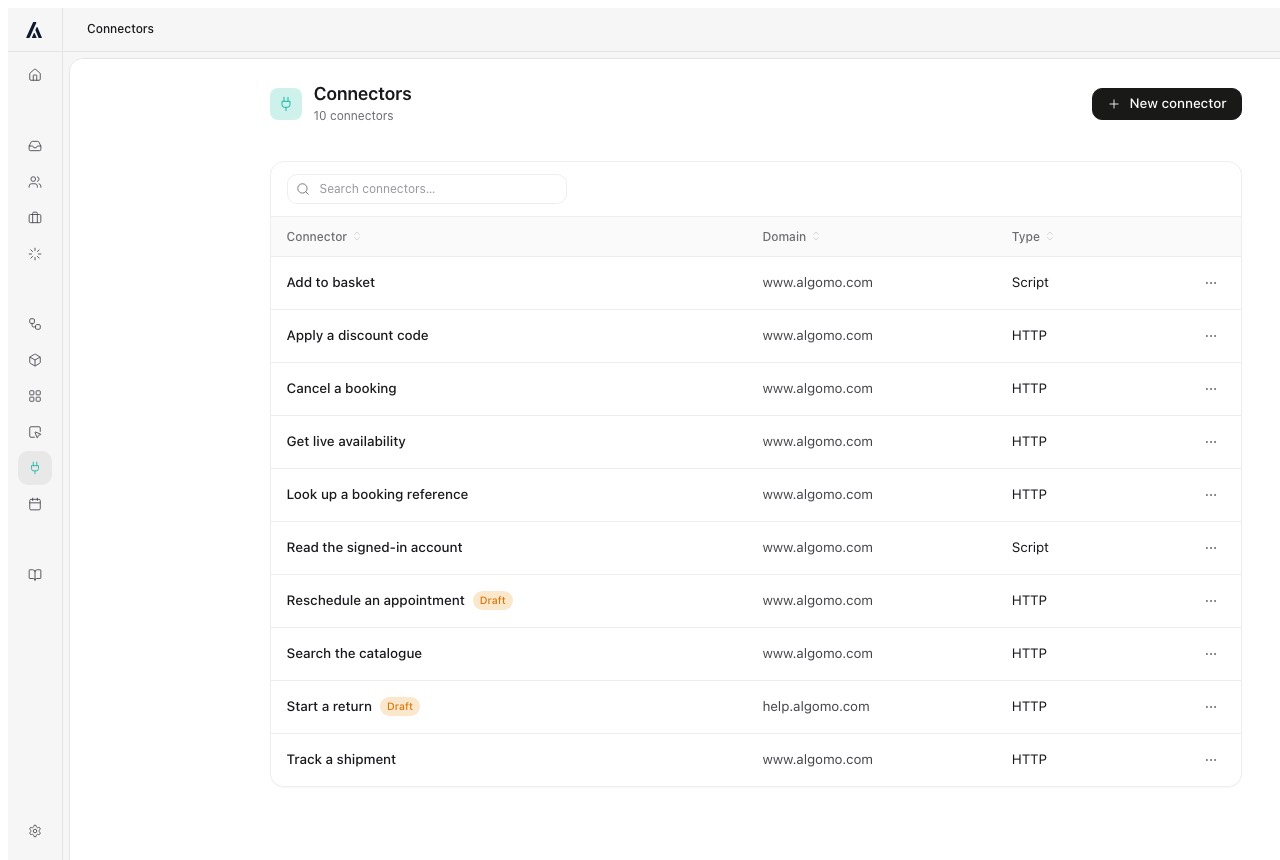
A staff-only system such as a CRM needs a connector, and that login is stored encrypted with AES-256-GCM and can be revoked at any time.
Algomo is certified to Cyber Essentials across the whole organisation and registered with the ICO under ZA821756. It works to UK and EU GDPR, the EU AI Act and DORA, and hosts its application, database and files in the EU. The data processing agreement covers every plan, and Algomo's compliance page has the detail.
Our take: if your procurement requires SOC 2 or HIPAA today, Crescendo meets it, and for everything else ask each vendor what it stores that could open a customer's account.
How much does Crescendo cost?
TL;DRCrescendo publishes no price and bills per resolution on a 12-month commitment sized with its sales team, with no credible third-party estimate available, while 1,500 helped conversations a month on Algomo fit the $200 plan.
Before signing, your finance team needs a number and a shape. The shape tells them what happens to the bill in a busy month.
How Crescendo bills
Crescendo's pricing address shows its home page, and every call to action is a demo request. Its Concierge page says you only pay when the AI resolves an issue, not when it routes one.
Crescendo's AWS Marketplace listing gives the shape. It is a 12-month contract, the unit is one AI-driven resolution across chat, voice, email and SMS, and you contact Crescendo to size the commitment. The listing says fees are non-cancellable and non-refundable.
We looked for an outside estimate. Vendr's page named Crescendo covers a different company, a sales app, so it says nothing about Crescendo's AI. Per-resolution figures in blog posts come from rival vendors and cite no Crescendo source, so we do not repeat them.
How Algomo bills
Algomo's free plan gives 100 credits a month, about twenty helped conversations, with no card. After that you choose one monthly amount between $50 and $4,300, with Enterprise above. Algomo's pricing page lists the ladder: $50 buys 2,000 credits, $100 buys 4,000, $200 buys 8,000 and $400 buys 16,000.
A helped conversation costs 5 credits, plus 5 for every further ten replies, and spam or gibberish costs nothing. The amount you choose is the most you can be charged. Unused credits roll over, and the agent pauses if they run out.
Here is the sum for 1,500 helped conversations a month of up to ten replies each. That is 7,500 credits, which the $200 plan covers with 500 to spare.
How each bill behaves
| Algomo | Crescendo | |
|---|---|---|
| Price on the website | ✓ Every plan, $50 to $4,300 a month | Not published |
| Start without a sales call | ✓ Free plan, no card | Demo request first |
| What you pay for | ✓ Credits per helped conversation | Each resolution |
| Contract length | ✓ One monthly amount | 12 months on AWS Marketplace |
| A busier month than planned | ✓ Capped at the amount you chose | Sized in the commitment |
| Human agents in the price | Your own team takes over | ✓ Available from Crescendo |
Our take: ask Crescendo for its rate per resolution at last month's volume and at double it, and compare both with the Algomo plan that covers the same number.
What to ask any vendor selling you an AI agent
TL;DRFive questions, each with a test you can run in the demo.
- Who connects the agent to our order or booking system, and when does it first answer from it? Ask for a date in writing.
- Does the answer come from our live page or from a stored copy? Ask the agent where its answer came from.
- If we edit a price now, what does the agent say in five minutes? Edit one and ask.
- Can it put an item in a basket or book a slot on the page? Ask it to.
- Can it do a step our website cannot, such as send a code or alert a manager? Ask it to do one now.
Run every test on your own site, not on the vendor's showcase.
Which one should your team choose?
Choose Crescendo if
- Most of your customers call, text or message on WhatsApp, and you want one AI across all of it.
- You want an outside team of human agents to take the escalations, not only software.
- Your procurement needs SOC 2 Type II or a HIPAA attestation from the vendor today.
Don't choose Crescendo if
- Your customers ask on your website, and the answers are on its pages and in the systems behind them.
- You want a working agent on your own site before you talk to sales or sign a 12-month commitment.
- An answer that lags behind a price or policy change on your site is a risk you will not take.
- You want the agent to act on the page for the visitor, in their basket and their account.
- You want a bill you can read in advance, fixed at an amount you choose.
Conclusion
TL;DRChoose Crescendo to outsource support across phone, text and chat with people included, and choose Algomo for a website agent that connects itself and answers from the live page.
On integration, Crescendo puts its own team and its Integration Agent on the work and aims for launch within 30 days. Algomo's AI finds and connects the systems behind your site itself, and the first version runs the same day.
On accuracy, Crescendo answers from the knowledge you connect or import, then audits it. Algomo reads the live page for each answer and backs that with a free month.
The comparison hub lists the other agents we have set side by side.
Questions buyers ask about Algomo and Crescendo
How much does Crescendo cost?
Crescendo does not publish a price. Its AWS Marketplace listing bills per AI-driven resolution on a 12-month contract, with the commitment sized by its sales team. We found no credible third-party estimate. Algomo has a free plan, then one monthly amount from $50 to $4,300 shown on its pricing page.
Who owns Crescendo?
Crescendo is independent. CrescendoAI Inc. bought the outsourcer PartnerHero in October 2024 and raised a Series C at a $500 million valuation, with General Catalyst among its investors. Co-founder Andy Lee, the long-time chief executive of Alorica, became CEO in July 2026.
Is Algomo a good Crescendo alternative?
Yes, if your customers start on your website and your own team will handle what the AI cannot. Algomo connects itself to your systems, reads the live page for each answer and starts free. If you want outside staff and phone coverage too, Crescendo is built for that.
Is Crescendo an outsourcing company or a software company?
Both. Crescendo sells an AI platform for voice, chat, email and messaging, and since buying PartnerHero it also supplies human agents who work alongside the AI under one contract.
Does Crescendo work on Shopify?
Yes. Crescendo's Shopify app imports store data, creates the assistant and adds it as a theme embed, and it can tag the orders the assistant influenced. Algomo needs no platform app and works on Shopify and any other website.
Is Crescendo the same as Crescendo Lab?
No. Crescendo at crescendo.ai is the AI customer experience company on this page. Crescendo Lab is a separate marketing software company.
Can I move from Crescendo to Algomo?
Yes. Give Algomo your website address and it finds the systems your pages call, with a first version the same day. Past tickets can be saved into Algomo's knowledge base, and a connector can still open tickets in the helpdesk your team uses.
Which AI model does Algomo use?
The default model is from OpenAI. On Enterprise you choose the provider, and the application, database and files stay hosted in the EU.
Where these facts come from
All the information on this page was available in November 2026. The sources are:
- Crescendo's home page: the agents, launch and integration figures, certifications and named customers.
- Crescendo's Concierge page: channels, actions and paying per resolution.
- Crescendo's Integration Agent page and Crescendo's Knowledge Agent page.
- Crescendo's Zendesk comparison: deployment, the 30-day launch target and the included expert team.
- Crescendo's AI Assistants guide, the HubSpot guide, the Shopify guide, the attribution guide and the version control guide, from Crescendo's docs.
- Crescendo's MCP endpoint reference.
- Crescendo's pricing address and Crescendo's AWS Marketplace listing.
- The Total Outcome Guarantee announcement.
- Crescendo's PartnerHero announcement and Crescendo's CEO announcement, for ownership.
- Crescendo's trust centre and Crescendo's subprocessor list.
- Vendr's Crescendo page, which covers a different company.
- Algomo's pricing page, Algomo's compliance page, the data processing agreement and the guarantee page.
- The demo library: the Blinds 2go demo, the Nike demo and the IKEA demo.